Annotations
Annotations let people add notes to the pages in an archive. A note is pinned to a specific capture (a URL at a timestamp) and can cover the whole page or a selected passage. It’s freeform Markdown, it’s public to read, and only a signed-in user can create one.
Where finding aids and crawl provenance describe a collection or a crawl, annotations carry that context gathering down to the individual page. The hope is that this will let curators flag why a capture matters, note what’s missing, or connect it to the rest of the record. (The framing is Michèle Valerie Cloonan and Ross Harvey’s lineage and, directly, Light & Hyry’s Colophons and Annotations; see the design notes.)
Who can annotate
Section titled “Who can annotate”Reading annotations is open to everyone. Creating, editing, and deleting them requires management access, which is the same gate as the rest of the workroom:
- On a workstation (
indice serveon loopback) you are the trusted admin, and notes are authored aslocal. - Behind a forward-auth proxy the authenticated user is the author, if they’re a curator or admin. Someone signed in but not on your
users.yamlroster is a reader, and can read notes but not write them.
You can edit or delete only your own notes, except that an admin named in a users.yaml roster can moderate anyone’s, so an abusive or orphaned note can be removed. Without a roster there are no distinct roles to speak of, so notes stay strictly author-only. On a loopback instance the own-only rule has nothing to distinguish: there’s a single local identity, so every note is editable by whoever is at the machine. Telling authors apart needs a forward-auth proxy.
Authorship and privacy
Section titled “Authorship and privacy”Each note records two different things about its author, and only one of them is published:
- a subject id, used to decide who may edit the note. It’s normalized (
alice@x.eduandAlice@X.eduare one person) and never displayed. - a display name, shown on the note. It’s derived from the identity your proxy forwards, with any domain stripped, so an
alice@x.edulogin is attributed toalice.
This matters because annotations are public to read and annotations.jsonl is meant to be committed to version control. Publishing the raw login identity could put contributors’ email addresses in front of anonymous visitors and into your git history. If your proxy forwards emails, only the local part is ever shown.
Creating a note
Section titled “Creating a note”Open any archived page in the replay viewer. With management on, a Notes panel is available beside the page (toggle it from the banner):
- Note on this page lets you add a note about the whole page capture.
- Note on selection lets you select some text in the replayed page first, then add a note anchored to that passage. The selected text is stored as a quote selector so it can be re-found and highlighted on future visits.
Notes are written in Markdown and saved immediately, which requires no rebuild or restart. A passage note shows its quoted text; on replay, the passage is highlighted in place in the page.

Where notes show up
Section titled “Where notes show up”A note you write is surfaced in several places:
- The replay panel includes every note on the current capture, with passage notes highlighted in the page.
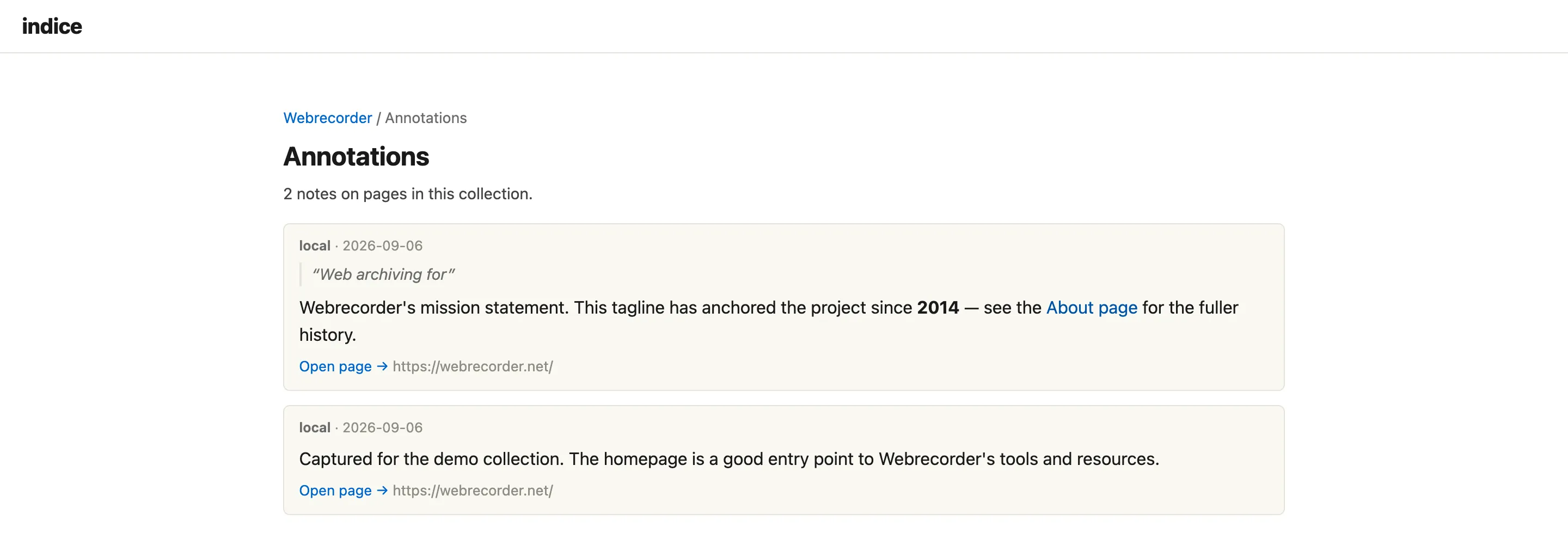
- The collection annotations index includes a per-collection browse at
/collection/<id>/annotations, linked from the collection page, listing every note with its author, quoted passage, and a link back into replay. - Full-text search each note is indexed as its own result (a “Note by …” row) so a search over the archive turns up relevant notes alongside pages. See Searching.
Markdown
Section titled “Markdown”Note bodies are rendered through the same sanitizing Markdown renderer as collection narratives and crawl notes: headings, emphasis, lists, blockquotes, inline code and code blocks, and links work; raw HTML is escaped, and only http/https/mailto links (and image alt text) survive, so a public write surface can’t inject scripts.
How a note finds its passage
Section titled “How a note finds its passage”A passage note stores a W3C Web Annotation TextQuoteSelector which is the exact quoted text plus a little surrounding context. On replay, indice re-locates that text in the page and highlights it, so a note keeps pointing at the right passage even though nothing is written back into the archived page itself.
Where notes are stored
Section titled “Where notes are stored”Annotations live in a JSON Lines file per collection:
<home>/collections/<slug>/annotations.jsonlOne W3C Web Annotation (JSON-LD) per line, keyed by the capture’s URL + timestamp. Because it’s a file it is diff-friendly and committable to version control alongside the collection’s finding aid, and it survives an indice reindex.
Reading notes is part of the public REST API (GET /api/annotations); creating, editing, and deleting them are management-gated write endpoints.